#18-0005
| Title |
Iridium SPNet Pro Release 2 – Training Materials Available |
| Effective Date |
10/18/18 |
| Expiration Date |
08/01/19 |
| Owner |
Leigh Henry |
Iridium SPNet Pro Release 2
Training Materials Available
Thank you to everyone who was able to join me for the SPNet Pro Updates for Release 2 Training, which was held on October 18, 2018. For those of you who may have been blissfully on vacation (holiday), or unable to attend due to other commitments, the presentation materials have been uploaded to Iridium for Partners. For your convenience, the recorded session is available for viewing on WebEx. You will be asked to provide your name, company and email address to access the recording.
Please forward this information to others within your company who may be interested in learning more on this topic. If you have any questions, contact Leigh.Henry@Iridium.com.
[button link=”/file/216142/” color=”orange” newwindow=”yes”] DOWNLOAD PRESENTATION[/button]
| Alert Type |
Partner Operations |
| Service |
Iridium SPNet Pro |
User guide for Iridium SPNet Pro Revision 1.
User Guide for Iridium SPNET Pro provisioning service.
The 27 October 2017 release of SPNet Pro features a new capability called “Local Number” dialing which will REPLACE Plus 1 (+1) capabilities. When activated, Plus 1 assigns a 10-digit US-based number that routes calls to the associated Iridium MSISDN. This makes contacting the Iridium subscriber easier and less costly for the caller.
Plus 1 numbers currently assigned to a contract will not be affected by this update.
A WebEx video has been created to demonstrate the difference between how Plus 1 is activated today and how Local Number dialing will replace it in this release.
Please forward this notification to others within your company who may be interested in this topic. If you have any questions or technical difficulties, please contact tier2support@iridium.com.
The 27 October 2017 release of SPNet Pro features a new capability called “Local Number” dialing which will REPLACE Plus 1 (+1) capabilities. When activated, Plus 1 assigns a 10-digit US-based number that routes calls to the associated Iridium MSISDN. This makes contacting the Iridium subscriber easier and less costly for the caller.
Plus 1 numbers currently assigned to a contract will not be affected by this update.
A WebEx video has been created to demonstrate the difference between how Plus 1 is activated today and how Local Number dialing will replace it in this release.
Please forward this notification to others within your company who may be interested in this topic. If you have any questions or technical difficulties, please contact tier2support@iridium.com.
Thank you to those of you who were able to join me for the SPNet Pro training session last week. For those of you who may have been blissfully on vacation (holiday), or unable to attend due to other commitments, the presentation materials have been uploaded to Iridium for Partners. For your convenience, the recorded session is available for viewing on WebEx. You will be asked to provide your name, company and email address to access the recording.
The password is: spnet17r1.
All documents related to this release are now available for download:
· SPNet Pro User Guide
· Iridium IWS Developer Guides (IWS and Reports)
· SPNet Pro: July 2017 Upgrade Presentation
Please forward this notification to others within your company who may be interested in this topic. If you have any questions or technical difficulties, please contact leigh.henry@iridium.com.
After the upgrade the majority of SPNet Pro reports have been moved under the Reporting tab. The SPNet Pro User Guide 2016 Release 2 provides detailed instructions for generating these reports in the Scheduled and On Demand Reports section starting on Page 120. These reports are similar to the Standard Reports that previously appeared under each individual service tab.
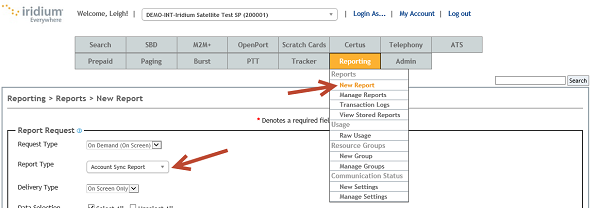
We’re still putting the finishing touches on the new version of the SPNet Pro User Guide for this release and expect it to be published this week. There are no major changes to the Scheduled and On Demand Reports section in the new version.
Also note that there is help for the entry fields when you let your cursor hover over them. If you are not sure what to put in a specific field, refer to the online help or the User Guide.
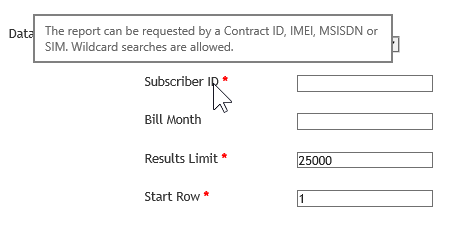
If you have further questions on the types of reports available, please contact Tier2Support@Iridium.com.
After the upgrade the majority of SPNet Pro reports have been moved under the Reporting tab. The SPNet Pro User Guide 2016 Release 2 provides detailed instructions for generating these reports in the Scheduled and On Demand Reports section starting on Page 120. These reports are similar to the Standard Reports that previously appeared under each individual service tab.
We’re still putting the finishing touches on the new version of the SPNet Pro User Guide for this release and expect it to be published this week. There are no major changes to the Scheduled and On Demand Reports section in the new version.
Also note that there is help for the entry fields when you let your cursor hover over them. If you are not sure what to put in a specific field, refer to the online help or the User Guide.
If you have further questions on the types of reports available, please contact Tier2Support@Iridium.com.
After the provisioning system upgrade on June 21, 2017, all SPNet users will be required to reset the SPNet password upon first login attempt by using the “forgot my password” link.
Any registered SPNet Pro user that has not logged into SPNet Pro since March 1, 2017 (and does not do so before June 21, 2017) will have SPNet access removed entirely and must be re-registered by the partner’s SPNet Administrator. Please contact Tier 2 Support at tier2support@iridium.com if you have further questions.
Provisioning & billing document: presentation for Iridium SPNet Pro User Forum event.